MPFR Agristack Madhya Pradesh Portal: Login & Registration Status Check 2026 (mpfr.agristack.gov.in)
MPFR Agristack Madhya Pradesh, known as the “Heart of India,” is a powerhouse of agricultural production. To further empower its farming community, the state government has launched the MPFR Agristack Farmer Registry (MPFR) as part of the national Digital Agriculture Mission. This initiative, integrated with the Agristack framework, aims to create a unified digital identity for every farmer in the state, streamlining access to subsidies, credit, and essential government services .
The MPFR is a transformative digital platform designed to assign a unique Farmer ID to each farmer in Madhya Pradesh. By linking a farmer’s Aadhaar number with their Samagra ID, land records (Khasra/B-1), and bank account details, the system creates a “single source of truth.” This unified identity eliminates the need for repeated document submissions and ensures that benefits like PM-KISAN, crop insurance, and MSP payments are delivered with unprecedented precision and transparency. This guide provides a comprehensive, step-by-step walkthrough of the MPFR Agristack Madhya Pradesh system, covering registration, login, and troubleshooting.
What is the Madhya Pradesh Farmer Registry (MPFR)?
The Madhya Pradesh Farmer Registry (MPFR) is a centralized digital database initiated by the Government of Madhya Pradesh to create a verified profile of all farmers in the state. It operates under the national Agristack mission, which is building a unified digital infrastructure for India’s agriculture sector .
The core objective of MPFR is to provide each farmer with a digitally verifiable Farmer ID. This ID is created by integrating multiple data points, including Aadhaar for identity, Samagra ID for family details, and MP Bhulekh for land ownership. This integration ensures that every farmer is uniquely identified and their land holdings are accurately mapped, which is essential for the fair distribution of agricultural benefits.
Why is MPFR Agristack Essential for Madhya Pradesh’s Farmers?
The implementation of MPFR is a significant milestone for the agricultural sector in Madhya Pradesh. Here’s why it is crucial for every farmer to register:
| Benefit Category | Specific Advantages of MPFR Registration |
| Streamlined Access to Schemes | – Single Window Access: Apply for all state and central government schemes (e.g., PM-KISAN, KCC, crop insurance) through a single portal. – Automated Eligibility: The system automatically verifies eligibility for schemes based on land and crop data, reducing paperwork and processing time. |
| Transparent Subsidy & MSP Disbursement | – Direct Benefit Transfer (DBT): Subsidies for seeds, fertilizers, and machinery are transferred directly to the farmer’s linked bank account. – Timely MSP Payments: MSP for wheat, gram, and other crops is processed faster as procurement agencies have access to verified farmer and land data. |
| Financial Services & Credit | – Easier Loan Access: Financial institutions can quickly verify farmer credentials and land ownership, simplifying the process for obtaining Kisan Credit Cards (KCC) and other agricultural loans. |
| Data-Driven Farming | – Personalized Advisories: Receive AI-powered advisories on crop management, weather forecasts, and pest control tailored to your specific land and crop type. – Improved Farm Management: Maintain a digital record of your land, crops, and production history, enabling better planning and decision-making. |
| Land Record Management | – Digital Verification: Easily link and verify your Khasra and B-1 records online, reducing the need for physical visits to government offices. – Reduced Disputes: A clear, digitally mapped record of land ownership helps in minimizing land-related disputes. |
Eligibility Criteria for MPFR Agristack Registration
To register on the MPFR portal, you must meet the following criteria:
- Residency: You must be a resident of Madhya Pradesh.
- Farmer Status: You must be an agricultural producer, either a landowner or a tenant farmer.
- Aadhaar: You must have a valid Aadhaar number with a linked mobile number for OTP verification.
- Samagra ID: You must have a valid Samagra ID (Family ID and Member ID).
- Land Records: You must have access to your land record details (Khasra/B-1) from the MP Bhulekh portal.
Documents Required for Registration
Keep the following documents and information ready before you begin the registration process:
| Document/Information | Details Required |
| Aadhaar Card | 12-digit Aadhaar number. The mobile number linked to your Aadhaar must be active to receive OTPs for e-KYC. |
| Samagra ID | 9-digit Member ID and 8-digit Family ID. This is essential for linking family and demographic data. |
| Land Records (Khasra/B-1) | Details such as District, Tehsil, Village, and Khasra number to add and verify your land parcels. |
| Bank Account Details | Bank account number and IFSC code for linking your account for DBT and other financial transactions. |
| Mobile Number | A personal mobile number for communication and OTP verification. |
| Passport Size Photo | A recent digital or physical passport size photograph. |
How to Register on MPFR Agristack Madhya Pradesh: A Step-by-Step Guide
There are two primary methods for registering on the MPFR portal:
- Self-Registration: For farmers who can use the online portal themselves.
- Assisted Registration via CSC/VLE: For farmers who need assistance, Common Service Centres (CSCs) or Village Level Entrepreneurs (VLEs) can facilitate the registration.
Method 1: Self-Registration on the MPFR Portal
Step 1: Visit the Official MPFR Website
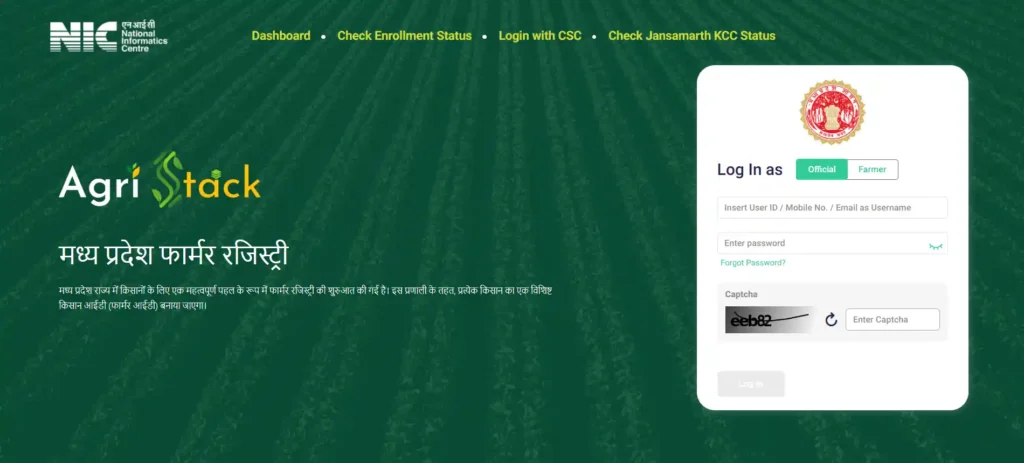
Open your web browser and navigate to the official Madhya Pradesh Farmer Registry portal: https://mpfr.agristack.gov.in/.
Step 2: Initiate Farmer Registration
On the homepage, locate and click on the “Farmer Registration” or a similarly named button.
Step 3: Aadhaar e-KYC Verification
Enter your 12-digit Aadhaar number and complete the captcha. Click on “Get OTP.” You will receive an OTP on your Aadhaar-linked mobile number. Enter the OTP to verify your identity. Your demographic details (name, address, etc.) will be auto-populated from the Aadhaar database.
Step 4: Enter Samagra ID and Bank Details
Provide your Samagra Member ID. The system will fetch your family details. Fill in the remaining personal details and provide your bank account number and IFSC code. This information is crucial for receiving subsidies and payments.
Step 5: Add Land Record Details (Khasra/B-1)
This is the most critical step. You will need to add your land parcels by providing the following details:
- Select your District, Tehsil/Sub-Tehsil, and Village.
- Enter your Khasra number as required.
- The system will fetch the land records from the MP Bhulekh database. Verify the details and add the land to your profile.
Step 6: Upload Documents and Submit
Upload a scanned copy of your passport size photograph and any other required documents. Review all the information you have entered one last time and click “Submit.”
Step 7: Receive Farmer ID
Upon successful registration and verification, a unique Farmer ID will be generated and sent to your registered mobile number. Keep this ID safe for all future transactions.
Method 2: Assisted Registration at a CSC Centre
If you are not comfortable with the online process, you can visit your nearest CSC. A Village Level Entrepreneur (VLE) will assist you with the entire process.
- Visit the nearest CSC with all the required documents.
- The VLE will access the MPFR portal through the Digital Seva portal.
- Provide your Aadhaar for biometric or OTP-based e-KYC.
- The VLE will fill in all your details, link your Samagra ID, and link your land records.
- Upon successful submission, the VLE will provide you with a printout of your registration and your new Farmer ID.
MPFR Agristack Madhya Pradesh: Farmer Login Process
Once registered, you can log in to the farmer dashboard to manage your profile, view scheme details, and track application status.
Step 1: Go to the MPFR Portal
Visit https://mpfr.agristack.gov.in/.
Step 2: Click on “Farmer Login”
Find the “Farmer Login” button on the homepage.
Step 3: Login using Farmer ID or Aadhaar
You can typically log in using your Farmer ID or Aadhaar number. You will receive an OTP on your registered mobile number. Enter the OTP to access your dashboard.
How to Check Your MPFR Enrollment Status
If you have already registered and want to check the status of your enrollment or find your Farmer ID:
- Visit the MPFR portal.
- Look for an option like “Know Your Farmer ID” or “Check Enrollment Status.”
- Enter your Aadhaar number or registered mobile number.
- The portal will display your registration status and Farmer ID if your profile has been approved.
Troubleshooting and FAQs
| Issue | Solution |
| Aadhaar OTP Not Received | Ensure your mobile number is correctly linked to your Aadhaar. You can verify this on the official UIDAI website. If it’s not linked, you must visit an Aadhaar Seva Kendra to update it. |
| Samagra ID Error | If your Samagra ID details are incorrect, you must update them on the official Samagra portal (samagra.gov.in) before registering on MPFR. |
| Land Record Mismatch | This can happen if the details on the MP Bhulekh portal are outdated. Contact your local Patwari or Tehsil office to get the land records corrected first, and then try registering on MPFR again. |
| “Invalid Captcha” Error | The captcha is case-sensitive. Refresh the page to get a new captcha image and enter it carefully. |
| Unable to find Land Record | Double-check the District, Tehsil, and Village selected. Ensure you are entering the correct Khasra number as per the latest B-1 record. |
Conclusion: Empowering Madhya Pradesh’s Farmers through Digital Identity
The Madhya Pradesh Farmer Registry (MPFR) is a foundational step towards a more efficient, transparent, and data-driven agricultural ecosystem in Madhya Pradesh. By creating a unique Farmer ID, the government is empowering farmers with simplified access to benefits and services. All eligible farmers in Madhya Pradesh are strongly encouraged to complete their registration at the earliest to leverage the full potential of this digital revolution.
References
[1] Ministry of Agriculture & Farmers Welfare, Government of India. “Digital Agriculture Mission.”