
PBFR Agristack Punjab Portal : Login, Registration & Farmer ID Staus Check 2026
Punjab, often called the “Granary of India,” continues its legacy of agricultural innovation. The state government has launched the Punjab Farmer Registry (PBFR) as part of the national Digital Agriculture Mission, a key component of the larger Agristack framework. This initiative is set to revolutionize how farmers in Punjab interact with government services, access crucial subsidies, and efficiently manage their agricultural data.
The PBFR is more than just a database; it’s a digital gateway designed to create a unique Farmer ID for every farmer in the state. This unified digital identity will streamline access to a multitude of government schemes, including MSP procurement for wheat and paddy, Direct Benefit Transfers (DBT), and advanced, AI-driven crop advisories. This comprehensive guide provides a step-by-step walkthrough of the PBFR Agristack Punjab system, covering everything from online registration and farmer login to linking land records and troubleshooting common issues.
What is the Punjab Farmer Registry (PBFR)?
The Punjab Farmer Registry (PBFR) is a centralized digital platform initiated by the Government of Punjab. Its primary goal is to create a comprehensive and verified database of all farmers within the state. Operating under the national Agristack mission, PBFR aims to build a unified digital infrastructure for India’s agriculture sector.
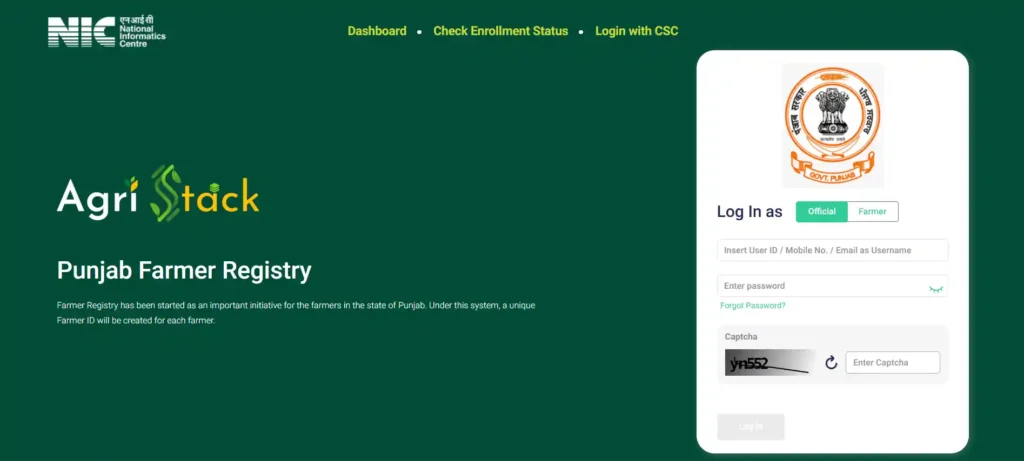
The core objective of PBFR is to assign a unique, digitally verifiable Farmer ID to each farmer. This ID is created by linking the farmer’s Aadhaar number with their land records (Jamabandi) and bank account details. This process establishes a “single source of truth” for each farmer, eliminating data silos and ensuring that benefits are delivered with precision and transparency.
Why is PBFR Agristack Punjab Registration Essential for Farmers?
The implementation of PBFR is a game-changer for Punjab’s agricultural landscape. Here’s why PBFR Agristack Punjab registration is crucial for every farmer:
| Benefit Category | Specific Advantages of PBFR Registration |
| Streamlined Access to Schemes | Single Window Access: Apply for all state and central government schemes (e.g., PM-KISAN, KCC, crop insurance) through a single portal. – Automated Eligibility: The system automatically verifies eligibility for schemes based on land and crop data, reducing paperwork and processing time. |
| Transparent Subsidy & MSP Disbursement | Direct Benefit Transfer (DBT): Subsidies for seeds, fertilizers, and machinery are transferred directly to the farmer’s linked bank account. – Timely MSP Payments: MSP for wheat and paddy is processed faster as procurement agencies have access to verified farmer and land data. |
| Financial Services & Credit | Easier Loan Access: Financial institutions can quickly verify farmer credentials and land ownership, simplifying the process for obtaining Kisan Credit Cards (KCC) and other agricultural loans. |
| Data-Driven Farming | Personalized Advisories: Receive AI-powered advisories on crop management, weather forecasts, and pest control tailored to your specific land and crop type. – Improved Farm Management: Maintain a digital record of your land, crops, and production history, enabling better planning and decision-making. |
| Land Record Management | Digital Verification: Easily link and verify your Jamabandi (land records) online, reducing the need for physical visits to government offices. – Reduced Disputes: A clear, digitally mapped record of land ownership helps in minimizing land-related disputes. |
Eligibility Criteria for PBFR Agristack Punjab Registration
To register on the PBFR portal, farmers in Punjab must meet the following criteria:
- Residency: Must be a resident of Punjab.
- Land Ownership: Must own or cultivate agricultural land within the state. Both landowners and tenant farmers are eligible.
- Aadhaar Card: Must possess a valid Aadhaar card.
- Mobile Number: Must have a mobile number, preferably linked to the Aadhaar card for OTP verification.
- Bank Account: Must have a bank account to receive DBT payments.
Documents Required for PBFR Agristack Punjab Registration
Before starting the registration process, gather the following documents. Having digital copies (scans or clear photos) is recommended for the online process.
| Document/Information | Details Required |
| Aadhaar Card | 12-digit Aadhaar number. The mobile number linked to your Aadhaar must be active to receive OTPs for e-KYC. |
| Land Records (Jamabandi/Fard) | Details such as District, Tehsil, Village, and Khewat/Khasra number to add and verify your land parcels. |
| Bank Account Details | Bank account number and IFSC code for linking your account for DBT and other financial transactions. |
| Mobile Number | A personal mobile number for communication and OTP verification. |
| Passport Size Photo | A recent digital or physical passport size photograph. |
Step-by-Step PBFR Registration Process (Self-Registration)
Farmers can register themselves directly on the PBFR portal. The process involves Aadhaar verification and is straightforward.
Step 1: Visit the Official PBFR Agristack Punjab Portal
Open your web browser and navigate to the official Punjab Farmer Registry website: https://pbfr.agristack.gov.in/.
Step 2: Initiate Farmer Registration
On the homepage, you will likely find a “Register” or “New Farmer Registration” button. The current interface directs users to the login section, where the registration process begins with Aadhaar verification.
Step 3: Aadhaar e-KYC Verification
- Select the “Farmer” login option.
- You will be prompted to enter your 12-digit Aadhaar number.
- After entering your Aadhaar, click on “Get OTP.”
- An OTP will be sent to the mobile number linked with your Aadhaar card.
- Enter the OTP in the designated field and submit. This completes the e-KYC (Electronic Know Your Customer ) process, which fetches your name, address, and photo from the Aadhaar database.
Step 4: Fill in Personal and Bank Details
Once your Aadhaar is verified, the registration form will appear. It will be pre-filled with some details from Aadhaar. You will need to manually enter:
- Father’s/Husband’s Name
- Bank Account Number
- IFSC Code
- Other personal details as required.
Step 5: Add Land Record Details (Jamabandi)
This is the most critical step. You will need to add details of the land you own or cultivate.
- Select your District, Tehsil/Sub-Division, and Village from the dropdown menus.
- Enter the Khewat, Khasra, or Khatauni number as found on your Jamabandi/Fard document.
- The system may fetch the land details from the PLRS database. Verify that the details are correct.
- You may need to upload a digital copy of your land record (Fard) for verification.
Step 6: Final Submission and Farmer ID Generation
After filling in all the details and uploading the necessary documents, review the entire form for any errors. Once you are sure all information is correct, click the “Submit” or “Register” button. Upon successful verification by the backend team, your unique PBFR Farmer ID will be generated and sent to you via SMS.
PBFR Agristack Punjab Registration via CSC (Common Service Center)
For farmers who are not comfortable with the online process or lack internet access, the government has enabled registration through the vast network of Common Service Centers (CSCs) or Suwidha Kendras.
- Locate a CSC: Find the nearest CSC in your village or block.
- Carry Documents: Take all the required documents (original Aadhaar card, copy of Jamabandi, bank passbook) with you.
- VLE Assistance: The Village Level Entrepreneur (VLE) at the CSC will assist you with the entire registration process. They will perform the biometric Aadhaar verification, fill the form online, scan and upload your documents, and complete the submission.
- Acknowledgement: The VLE will provide you with an acknowledgement receipt for your application.
How to Login to the PBFR Agristack Punjab Portal
Logging into the PBFR portal allows you to view your profile, check scheme status, and update your details.
- Go to the PBFR Website: https://pbfr.agristack.gov.in/
- Choose Login Type: On the homepage, you will see login options for “Farmer” and “Official.” Select “Farmer.”
- Enter Credentials: You can typically log in using:
- Aadhaar Number + OTP: Enter your Aadhaar and receive an OTP on your linked mobile.
- Farmer ID + Password/OTP: Once your Farmer ID is generated, you can use it to log in.
4.Access Dashboard: After successful login, you will be taken to your personalized dashboard.
How to Check Your PBFR Agristack Punjab Enrollment Status
If you have already registered and want to check the status of your application or Farmer ID generation, follow these steps:
- Visit the PBFR portal homepage.
- Look for a link that says “Check Enrollment Status.”
- Click on it and enter your Aadhaar number or the application reference number you received during registration.
- The system will display the current status of your application (e.g., Pending Verification, Approved, Farmer ID Generated ).
Troubleshooting and Common Errors
| Issue | Solution |
| Aadhaar OTP Not Received | Ensure your mobile number is correctly linked to your Aadhaar. You can verify this on the official UIDAI website. If it’s not linked, you must visit an Aadhaar Seva Kendra to update it. |
| Land Record Mismatch | This can happen if the details on the PLRS portal are outdated. Contact your local Patwari or Tehsil office to get the land records corrected first, and then try registering on PBFR again. |
| “Invalid Captcha” Error | The captcha is case-sensitive. Refresh the page to get a new captcha image and enter it carefully. |
| Unable to find Land Record | Double-check the District, Tehsil, and Village selected. Ensure you are entering the correct Khewat or Khasra number as per the latest Jamabandi. |
PBFR Helpline and Support
For any technical difficulties or queries related to the PBFR portal, you can reach out to the official support channels. While a dedicated PBFR helpline number is yet to be widely publicized, you can contact the Punjab Agriculture Department for assistance.
- Punjab Agriculture Department Helpline: 0800-15000 and 0800-29000
- Official Agriculture Department Website: agri.punjab.gov.in
Frequently Asked Questions (FAQs) about PBFR Agristack Punjab
Q1. What is the official website for Punjab Farmer Registry?
The official website is https://pbfr.agristack.gov.in/.
Q2. Can a tenant farmer register on PBFR?
Yes, both landowners and tenant farmers in Punjab are eligible to register on the PBFR portal.
Q3. What is the cost of PBFR registration?
PBFR registration is completely free of charge. Do not pay any money to anyone for this service.
Q4. I have land in multiple villages. Do I need to register separately for each?
No, you can add all your land parcels under a single Farmer ID during the registration process.
Q5. How is my data on PBFR kept secure?
The PBFR platform is built with robust security measures. Your data is protected under government data privacy policies, and access is controlled through secure login mechanisms like Aadhaar OTP.
Conclusion: Embracing the Future of Agriculture in Punjab
The Punjab Farmer Registry (PBFR ) is a transformative step towards a more efficient, transparent, and farmer-centric agricultural ecosystem in Punjab. By creating a unique digital identity for every farmer, the government is paving the way for seamless delivery of services, from subsidy distribution to crop procurement and personalized advisories.
While the initial registration might seem like a procedural step, its long-term benefits are immense. It empowers farmers by putting them in direct contact with government schemes and financial aid, reducing their dependency on middlemen and protecting them from corruption. All eligible farmers in Punjab are strongly encouraged to complete their PBFR registration at the earliest to unlock the full potential of digital agriculture and secure their place in a modern, data-driven farming future.
References
[1] Agri Stack Official Portal. Ministry of Agriculture & Farmers Welfare, Government of India.
